Category Archives: #edtech #scitech
Data Literacy with ‘Explore’ in GoogleSheets
Super-quick lesson idea for teaching datasets and presentation types. When processing data in Google Sheets, use the ‘Explore’ feature, highlighting parts of the dataset. Click here for an example (to save a copy, go to ‘file –> make a copy’).
For: Sciences, Maths
Thanks to Liz Durkin (@lizdk) for the reminder of this feature.
Questions to ask students
- What are different types of data (continuous, discontinuous)
- Why do we use graphical presentations of data?
- What information do we need to be able to present data clearly?
- Why are some data presentations suitable for some sets of data and not others?
- How are the ‘basic’ presentations of data limited? (or Why can’t I use a bar chart for everything?).
- How does my interpretation of the data change when I change the graph or chart type?
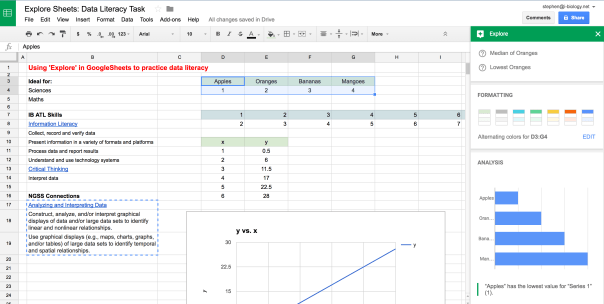 Explore in GoogleSheets – a quick way to visualize some of the data collected in an experiment or survey, and an opportunity to teach some data literacy and critical thinking skills. Click to open.
Going Further: Here is a set of resources for more advanced data presentation and statistics, used for IBBio, but useful for more: IBBio Statbook by Stephen Taylor. This one is for MYP Chemistry.
………o0O0o……….
MYP ATL Skills
| Information Literacy |
| Collect, record and verify data |
| Present information in a variety of formats and platforms |
| Process data and report results |
| Understand and use technology systems |
| Critical Thinking |
| Interpret data |
NGSS Connections
| Analyzing and Interpreting Data |
| Construct, analyze, and/or interpret graphical displays of data and/or large data sets to identify linear and nonlinear relationships. |
| Use graphical displays (e.g., maps, charts, graphs, and/or tables) of large data sets to identify temporal and spatial relationships. |
GoogleEarth Engine Timelapse: Quick Lesson Plan
Here’s a quick lesson plan idea for tuning into inquiry using Google Earth Engine Timelapse*. It can provide a timelapse of change from 1984-present, based on satellite and aerial photos.
Context
Ideal for: Individuals & Societies, Sciences, Interdisciplinary Unit
Global Context(s): Fairness & Development or Globalization & Sustainability
Key Concept(s): Change, Development, Interactions, Time-Place-Space
Related Concepts (I&S): Globalization, growth, resources, sustainability, causality
Related Concepts (Sciences): Environment, transformation, consequence, evidence
Tuning In
Find where we live and model See-Think-Wonder (Project Zero) on the timelapse from 1984-now. You might want to create a GoogleSheet with columns for each stage, to be shared with the class. Alternatively, get out some big whiteboards or butcher paper.
- See: look for general outlines, specific landmarks, big developments, interesting changes. Then dig deeper – compare the start to the end, or look for evidence of significant events in the time period. Keep pushing the ‘see’ until ideas are truly exhausted.
- Think: connected to the ‘see’ statements, note potential cause-effect relationships, sequences, consequences or other ideas. Keep going until this is exhausted.
- Wonder: finally build on the ‘see’ and ‘think’. What questions does this generate? Categorize and rank the questions.
Finding Out
- What lines of inquiry will you take to find out more?
- What can be found out by students and what needs to be explicitly taught?
- What unit-related vocabulary needs to be used and taught?
Approaches to Learning
- Access information to be informed and inform others
- Make connections between various sources of information
- Understand and use technology systems
- Practise observing carefully in order to recognize problems
- Interpret data
- Draw reasonable conclusions and generalizations
- Revise understanding based on new information and evidence
- Formulate factual, topical, conceptual and debatable questions
- Use models and simulations to explore complex systems and issues
- Identify trends and forecast possibilities
……….o0O0o……….
*HT Twitter:
PaperPile: Managing Citations in GoogleDocs
I have been looking for something that can replace MS Word’s citation manager and work in a similar way to Zotero. Here’s a quick post on how to use the PaperPile add-on for managing references in GoogleDocs. Paperpile is free from the Chrome store, though I am using the upgraded version.

The Environment is Interdisciplinary
Working with Eco Club and thinking about the complexities of the interactions, causes, effects and issues we need to tackle, I am often reminded of this Lovelock quote, from a 2014 interview in the Guardian. Perhaps if we can get interdisciplinary teaching and learning right in our schools, we can help students make the connections they need to truly understand the deeper causes of the problems they might need to solve.
For a more detailed post on how we’re trying to tackle IDU’s, please see my blog.

James Lovelock on the challenge of really teaching people about the environment, from this Guardian interview: http://gu.com/p/3zx4j
Harvard Stem Cells Breakthrough: Diabetes
This recent news from Harvard is a perfect fit for the IBBio course, connecting lots of what we have learned in the course. Watch this short TED Talk from Prof. Doug Melton on how they are using stem cells to create new insulin-producing beta cells. Then read this article from the Harvard Gazette on the most recent developments in their work.
………..o0O0o………..
Goal: Produce a poster, blog post or short presentation to communicate Melton’s team’s breakthrough, including connections to the IBBio course.
Role: You are science communicators.
Audience: Your peers – high school students and teachers.
Scenario: Stem cells and diabetes are both headline-grabbing stories. As we develop more treatments for diseases using stem cells, the public need to be well informed of the reality of what is happening – and inspired by the future.
Product: Large visual poster, blog (500 words with media) or short presentation (4-5 mins).
……….o0O0o……….
Required information
- Explain that Type 1 diabetes is “an autoimmune metabolic condition in which the body kills off all the pancreatic beta cells that produce the insulin needed for glucose regulation in the body.” [article, paragraph 14]
- Outline the usual treatment needed for type 1 diabetes.
- Outline the properties of stem cells.
- Explain how stem cells differentiate to become differentiated cells.
- Describe the work of Melton’s team to create beta-cell lines derived from stem-cell lines.
- Outline the proposed treatment for type 1 diabetes through implanting the newly-produced beta-cells.
- Discuss any caveats or limitations to the method.
- Discuss any ethical implications for the use of stem cells in this manner.
- Define any new or technical terms used (or discovered in your research) for the audience.
Going Further
- Distinguish between type 1 and type 2 diabetes.
- Evaluate whether this method would be as effective for type 2 diabetes as for type 1, with reasons.
………..o0O0o……….
Teacher Notes
- This could be used to teach part of the homeostasis topic once students know about stem cells, or as a review tool for later in the course.
- Students should refer to the subject guide to check their use of terminology and to regulate the depth of explanation.
………..o0O0o……….
Connecting Type II Diabetes
Here is Doug Melton talking about how we might use hormones to treat Type II diabetes:
Ecosia – the search engine that helps plant trees
Thanks to David Faure for pointing this out.
Have a go at Ecosia, a search engine that donates 80% of its profits to reforestation projects in Brazil. Find out more about how this work on this page, and give it a go!
Try Ecosia now. You can add it as a Chrome extension, too.
PCR Song: Class Project & TED Ed Lesson
This song by BioRad is a funny discussion starter on the polymerase chain reaction (PCR) and biotechnology. For a full lesson plan, with editable slides for students and a complete TED Ed lesson (with quiz), visit the full page.

Click to go to the TED-Ed lesson on PCR.
Review Vocab Quizzes with Quizlet
In this task we ‘crowd-sourced’ definitions and descriptions for a lot of the (lot of) vocabulary we have learned this year. This is to reinforce that Biology is as much a language course as a science course, and that everything is connected.
- Create a google spreadsheet with tabs numbered by subtopics covered
- Assign groups of topics to groups of students, with the simple task:
- First column, keyword, correctly spelled
- Second column: definition (exactly from subject guide if it exists) or clear description
- After groups finish, peer-edit
- Does it make sense? Are there any errors?
- It the definition clear in the ‘wider sense’ of the course?
- Adapt definitions with clarifications, or starters such as ‘process’, ‘structure’, ‘hormone’ etc
In our spreadsheet, we identified 312 terms (and growing) from this year.
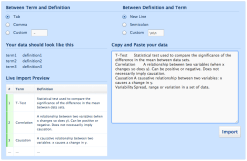
Click to start a Quizlet set
In between sessions:
- Check and edit as much as needed/possible
- Import vocab into quizlet to create the set
- Very easy: select columns and paste into the right-hand field
- Make sure ‘tab’ is set, top-left
- Hit ‘import’ if it looks right
- Create quizzes/activities
- Share quizlet codes and spreadsheet URL with students
- Get reviewing!
During classes:
- Students can review using the Quizlet activities
- Students might use the vocab list to make sure they are meeting markscheme requirements for target language – are they giving complete and correct answers?
- Students can use the vocab as a foundation for concept-maps, model responses etc.
Example (sadly Quizlet doesn’t embed to WordPress.com)
- MrT’s class, Year 1 vocab (student definitions)
……….o0O0o………
If you have any creative – and effective – review methods, let us know in the comments or on Twitter!
Can you solve this?
Have a go at this – pause at 1:30 and get chatting before moving on! Another great video by Derek Muller (@veritasium), and will be useful in discussions of the scientific method, hypothesis testing and the nature of science.
A no is usually more useful than a yes…
Getty Image Library has been set free
This is big news this week for teachers and students who need media for their online projects. Getty, the giant photo agency, have opened up their library for free use as long as you use their embed tool.
This is timely as we think more carefully about Approaches to Learning in the MYP and DP, in particular Media and Information Literacy clusters and the skills of accessing and appropriately using information from other sources.
Here’s an example:
Cool!