Category Archives: Assessment
(If You) USEME-AI: The Book
Available from April 1 2026 on Kindle, including Kindle Unlimited subscriptions. Print version is out Now too!
In the space between EdD phases, I’ve been working on a special project… writing my first full book. This has been a real labour of love over the last many months of weekends and evenings, and it’s finally out.
(If You) USEME-AI: Learning for Hope & Agency in an AI World is is a love-letter to education in a time of accelerating change. It builds on 20 years of experience in IB schools, the last 15 years on this blog, ten years of engagement with Cultures of Thinking, four years of work on AI and three years of EdD studies, all pointing in the same direction: a focus on hope, agency and co-creating futures of education that might possibly shine a light on something better. I’ve been writing about this since about 2014 and feel that we need this now more than ever. To do that we need to understand much more than the clicky-click of AI tools.
It frames the reader as a pragmatic idealist, someone who holds onto their values and vision whilst recognising the pressing challenges of now, approaching them with a level head and focus on workable solutions. Across 12 chapters it works through the elements of (If You) USEME-AI, with SideQuests on Mitigation, Adaptation & Innovation, Assessment & Feedback and the TEMPERed Learner along the way. Explore the chapters here.
As we go through the book, it connects learning theories and approaches, aiming to ensure strong foundations so that we can engage with AI with intentionality, purpose and a strong focus on protecting powerful thinking, learning, ethics and the capacities that make us uniquely human in an increasingly automated world. It challenges us to think deeply about what is important, connect new ideas and hold onto a vision of learning that is optimistic, informed and grounded. It makes many connections to UNESCO & OECD guidance and competencies. It aims to balance caution and ethical approaches with suitable applications of AI that might inspire students to do something special and help teachers develop their own practices.
Throughout the book, we spend a year at “Wayfinder International School“, with vignettes from fictional characters Ziggy, Izzy, Ozzy & Jazz, teachers and students approaching the challenges of AI from different perspectives. Meet them here.
Each chapter across the (approximately) 350 pages goes from the balcony of big ideas to the dancefloor of practical strategies, calling at the DJ booth of research. I’ve written it to be as conversational and approachable as possible, whilst connecting it to current research. There are hundreds of references across the book; pretty much everything useful I’ve read in recent years. Each chapter includes a lot of reflective questions, “try this” moments, and prompts to help model your learning as you go.
There is also an extensive, open-access support site for the book. This includes materials for each chapter, a reflective journal (hosted locally), buckets of resources, downloads and a large library of Poes and Prompts to try. The Environmental Impacts Estimator lives here too, with lessons, research and workshop materials. A few more surprises and resources are scattered across the site. The site will be updated as new research emerges or ideas pop into my head. The blog page curates posts from here related to the topics of the book.

The book cover is human-created, by my daughter Anya. It has a swirl of Ginkgo leaves over circuitry, representing connections between the enduring past (Gingko is a ‘living fossil’), the natural world and technology-mediated futures.
My fingers are aching, my brain is mush and my heart is full (I think). It exists! I hope you like it even just a fraction of how much I’ve enjoyed creating it. I think I’ve left everything on the page.
Huge thanks to my friends, family, colleagues and researchers who have inspired and supported this work.
The book will be published first on Amazon Kindle. Links here. It’s available to buy for GBP 8.99 or equivalent. That’s less than the coffee and tiramisu I ordered while writing this post. If you have Kindle Unlimited, it will be free on there for 90 days. The print version will be available very soon.
PaperPile: Managing Citations in GoogleDocs
I have been looking for something that can replace MS Word’s citation manager and work in a similar way to Zotero. Here’s a quick post on how to use the PaperPile add-on for managing references in GoogleDocs. Paperpile is free from the Chrome store, though I am using the upgraded version.
Review Vocab Quizzes with Quizlet
In this task we ‘crowd-sourced’ definitions and descriptions for a lot of the (lot of) vocabulary we have learned this year. This is to reinforce that Biology is as much a language course as a science course, and that everything is connected.
- Create a google spreadsheet with tabs numbered by subtopics covered
- Assign groups of topics to groups of students, with the simple task:
- First column, keyword, correctly spelled
- Second column: definition (exactly from subject guide if it exists) or clear description
- After groups finish, peer-edit
- Does it make sense? Are there any errors?
- It the definition clear in the ‘wider sense’ of the course?
- Adapt definitions with clarifications, or starters such as ‘process’, ‘structure’, ‘hormone’ etc
In our spreadsheet, we identified 312 terms (and growing) from this year.
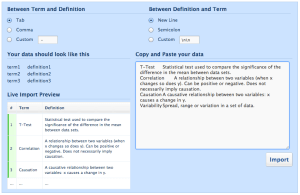
Click to start a Quizlet set
In between sessions:
- Check and edit as much as needed/possible
- Import vocab into quizlet to create the set
- Very easy: select columns and paste into the right-hand field
- Make sure ‘tab’ is set, top-left
- Hit ‘import’ if it looks right
- Create quizzes/activities
- Share quizlet codes and spreadsheet URL with students
- Get reviewing!
During classes:
- Students can review using the Quizlet activities
- Students might use the vocab list to make sure they are meeting markscheme requirements for target language – are they giving complete and correct answers?
- Students can use the vocab as a foundation for concept-maps, model responses etc.
Example (sadly Quizlet doesn’t embed to WordPress.com)
- MrT’s class, Year 1 vocab (student definitions)
……….o0O0o………
If you have any creative – and effective – review methods, let us know in the comments or on Twitter!
Processing Data: A Department Student Learning Goal
In the 2012-13 school year, our science department worked on a collaborative Student Learning Goal to improve student performance in Criterion E: Data Processing. Click here to find out more about the process, outcomes and next steps.
What are we really learning from practical work?
As we study science, a lot of our time and resources are devoted to implementing an engaging practical scheme of work. Are we really making the most educational use of this time, these resources and the opportunities that we have?
Teachers all over the world use experiments and demonstrations to engage students in the concept being taught. But does this actually improve student learning? Two recent videos have got me thinking about this issue, and before you read on you should watch them both.
The first is from UK science teacher & communicator Alom Shaha (@alomshaha), half the brains behind the sciencedemo.org website. The video was produced for the Nuffield Foundation’s new Practical Work for Learning resource. He refers to a number of research papers in the video, and is also one of the leaders of the #SciTeachJC (science teachers journal club) twitter discussion group.
Do you recognise those labs and how do you use them? Do the labs we do really help us teach the concepts we intend them to, and how can we rethink (or at least evaluate) our use of labs.
The second video is from US Chemistry teacher Tom Stelling (@ChemistTom), on his “vRant” about students asking to “blow something up” and the dangers of ‘wow’ demos as distraction rather than education.
https://twitter.com/ChemistTom/status/332685283105587200
Note: this post rambles a bit from here on. If you want to know more, please read on. Otherwise, all the good bits were in Alom & Tom’s videos.
Personal GoogleSites: A Learning Project in #IBBio
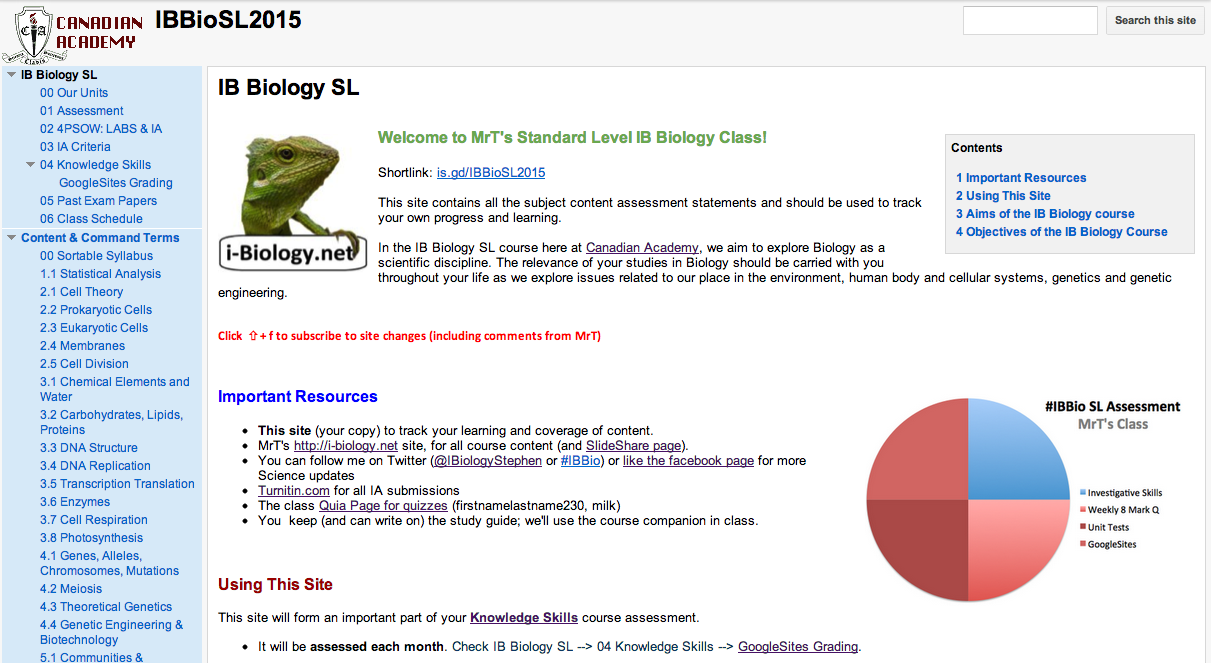
Personal GoogleSite: Click to view an example.
Although i-Biology hosts all my content resources, the main class resource students are working with is a personal GoogleSite to track their progress and reflection. Click here to find out more about how it works.
IB Biology: Sortable Syllabus
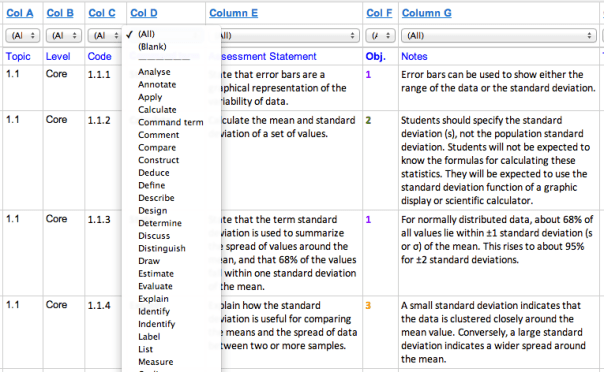
I made this document to help my students review for their mock and final exams. It is the syllabus presented as a sortable Google Spreadsheet. There are tabs at the top for Paper 1 & 2: Core content, Paper 1 & 2: Core & AHL content, and for each subtopic.
- Go to “View –> List view”.
- Use the sort feature to target individual command terms, topics, objectives or levels.
- It also has the ability to sort by suggested TOK connections or aims.
It does not include any images from the subject guide, as these cannot be included in cells to sort, so you will need to use your own copy or the text(s).
This could be a powerful review tool if used in response to practice papers or as a formative/ self-assessment tool. If a student is identified as weak in a particular command term, they can sort their revision and set priorities. It should allow for quick and focused differentation of exam preparation.
Forces & Motion
As our G10 class get working on the Forces and Change in Motion unit, I thought it was time to update the resources to take advantage of the Stratos jump and try out GoogleDocs* and presentations embedded into WordPress.
This task was designed based on student feedback from the last unit test. Some students wanted more (!) test-like situations and practice with the criterion, so I put this together. Prior to this lesson we had some short discussion on prior knowledge on forces (based on sports day situations) and free body diagrams. The rest they were learning as they went along. It was more engaging than I expected – lots of reaching for whiteboards, cooperative arguments and research.
The presentation for the unit is first, with the stimulus video next and the task below.
Note: interestingly the GPresentation embedded fine, but the embedded GDoc lost its formatting.
Aligning IBDP Biology and SAT Biology subject tests. Any takers?
This weekend is SAT Biology subject tests, which will be fun for a handful of kids in our IBDP school. I spent some time today with some IBSL year 1 students who needed help covering the content. We had fun with the respiration, photosythesis and DNA replication, but it made me realise I don’t know how and where the two testing systems overlap.
Are you experienced in teaching both and do you want to help out? If so, please open this GoogleDoc and add the relevant SL/HL subtopics in line with the SAT Bio subject test topics. If you really want to, add the links to the relevant i-Biology pages.
Let’s see how this works!
Updated Turnitin GradeMark QuickMarks
Here’s a new set of Turnitin GradeMark QuickMarks I have saved to Box.net. More IA resources on the IA pages here.
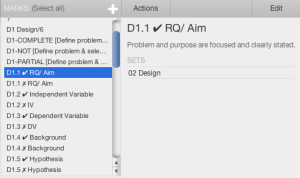
My QuickMarks – click to download
They correspond to the self-assessment codes in the rubric and checklists I use with students, and will only work if your school subscribes to the full Turnitin WriteCycle suite. Each comment has a check or cross, a title and some guidance or further description in the box. You can add your own comments individually to each as you use them in student work.
- IA Grades (Simple “6 CCC” and “5 PCP” comments in various combinations)
- Academic Honesty & Presentation