Category Archives: #edtech #scitech
Extreme Biology: Student Blogging

Visit ExtremeBiology!
I’ve posted about this before, and have ExtremeBiology featured as an RSS Feed at the bottom of this page. For those who have yet to visit though, check out Stacy Baker’s Extreme Biology website. Clearly an inspirational Biology teacher, her students have been blogging and podcasting about Biology. Some are now featured bloggers on Nature’s Scitable learning resource. Way to go!
It looks like Stacy is taking a break from teaching (it is an exhausting career!) – but hopefully not the blog. Thank-you for your work and congratulations and good luck to your graduating students.
The $50 SMARTBoard
This is just unbelievable, for two reasons:
1. If it works, you get thousands of dollars of functionality for near nowt.
2. You get an excuse to bring a Wii to school.
Here’s Johnny Lee and his Wii hacks (thanks to Henri Bemelmans for letting me know):
And while you’re at it…
Go and spend some time on the TED (Technology, Entertainment, Design) website – there are some really top-class talks.
Fizzix is Phun
I’m a bit worried about posting this so close to the DP exams*, but it is irresistable…
Ben Goldacre posted this video on the badscience blog – it’s a Physics toy for the computer, which can be downloaded here: phun.at.
The comments page turned up a load of other good toys to play with, so go on over to the original post and check them out.
There are plenty of videos of Phun in action on YouTube.
*potential 10 on the procrastinometer
Footprints Science – loads of simple, clear interactives
 This site has a good collection of animations and interactives aimed at KS3/GCSE levels. It is divided into Bio, Chem and Phys and has a section on coursework. Well worth spending time having a look there, especially as most of them can be saved easily.
Special prize for anyone who can work out what the Taj Mahal is doing in the banner for a Science website.
Biologymad.com – A-Level study site and lots of resources
 Biologymad has plenty of resources for A-Level Biology (many of which can be used for IB). There are a few simple animations on the resources page, including the golgi apparatus Flash linked to in the image.
They also offer free Moodle hosting for Biology courses, with the proviso that the course must be free to the students.
QUIA – A powerful course management system online
 This service is worth having a go at. You can build a class webpage easily, set games and activities and assess quizzes. There is a free 30-day trial for teachers. If you decide you like it, it’s US$50 per year, per instructor account. Students, however, can use it for free and once they’re logged in can access a lot of resources from any discipline.
Here is an example page – it took an hour or so to set up and the quizzes took about an hour each.
HyperHeart – da dumpf, da dumpf, da dumpf
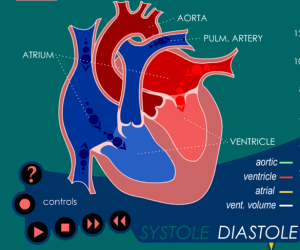 Thanks again to bogstandardcomp from the TES Boards.
This Shockwave app shows the full cycle of the heart beat and can be paused at any point. It includes ‘live’ ECG and blood pressure graphs and some tutorials (though I had difficulty getting them to work). Conveniently, it can also be saved using Firefox or Flashcatcher, to be used on the whiteboard.
Derryclare also posted a great link:
How to Build Tricky Compounds and Make a Cup of Tea
 Have a go at this demo from Presence Multimedia, aimed at A-Level students. It can be saved, is a bit of a challenge and works on the SMART Board.
A simple hunt around their site reveals other educational gems, such as ‘How to Wire a Plug‘, a ‘Personal MOT (good for ATL), and ‘How to Make a Cup of Tea‘.
Yes, you read that correctly – there is a Flash app on the internet to teach you how to make a cup of tea.
How to Wire a Plug
 Simple flash app, allows you to blow up a TV. Can be saved easily.
Thanks to hooper from the TES Boards.
Saving Videos – post updated
Some more techniques added: https://sciencevideos.wordpress.com/2007/09/19/saving-videos/