Category Archives: #edtech #scitech
Hanging Out with Andy Revkin
“How do we head through nine billion people by around 2050 without really screwing up too much?”
Andy Revkin writes the DotEarth blog for the New York Times, and has been writing about the environment for almost thirty years. His topics are diverse (and his Twitter stream rich with links) and connected to much of what our students have chosen to explore in our current Environmental Sciences unit in Grade 10 (MYP5).*
He very kindly agreed to G+ Hangout with some students before school, to discuss science writing in general and how he masters his craft on the environment beat. We learned a lot from Andy, and loved his assertion that he is not a ‘doom and gloom’ writer, but that the environment is different, and more complex than we first thought.
……….o0O0o……….
Here are links to some of the ideas & issues he mentioned in the chat:
- His ‘Postcards’ series, snapshots of science and environmental research
- Psychology & the environment
- Schools and syllabuses designed with the environment in mind
- Twitter in the classroom
- Obama and the National Academy of Sciences
- Will we have fewer, more dangerous hurricanes?
- The Burning Season book: the murder of Chico Mendez
……….o0O0o……….

Andy chatting with the early arrivals on G+ Hangouts.
*As part of our current Grade 10 Environmental Science unit, students have broken into groups depending on their interests and IBDP Sciences choices. They have designed their own unit content, though assessment types are common – a lab they design, a test we’ll write based on their chosen assessment statements and a piece of science writing. I’ll dedicate a whole post to how the unit worked once we’re done.
For the science writing task, students are asked to find real-life articles, case-studies or stimulus materials that will provide a context for some of their content. We showed them some models, of great science writing, but I realised my Twitter lists were light on environment writers.
A quick tweet (and some follow-up emails) fixed all that:
https://twitter.com/ferrisjabr/status/322324597791916032
Thanks again to Andy for chatting to us – it was a great opportunity to talk to a real pro.
It is also evidence, once again, that Twitter can be an amazing tool for classes and professional development.
Electronics Bathed in Blood & Destruction
Although George Monbiot’s fruitless search for an ethical smartphone has ended with the discovery of tin for parts being sourced through child labour on the Bangka Islands in Indonesia, it has turned up a lot of useful resources that could form great prompts for an MYP Sciences, Design and Economics inter-disciplinary unit on life cycles of electronics.
Some ideas that could be pitched at different levels for students:
- What is life cycle analysis and what do we mean by ‘designed for the dump’?
- How can we create resources that help us appreciate what we have, rather than feeling the ‘need’ to pick up the latest and greatest?
- Design a campaign or project based on one of the 8 R’s (below).
- Analyse and evaluate the data in the Short Circuit report. Write a case study or investigative piece one one og highlight facts, issues, problems or potential solutions.
- Collect and analyse community data on perceptions of need, rate of purchase and disposal of electronics. Do people know what is in them, where their dangers are and where they end up?
One of the resources shared by Monbiot was this fantastically detailed document called the Short Circuit Report, produced by the Gaia Foundation & Friends of the Earth’s Make It Better campaign. It is packed with information, data and images. One in particular stood out as a discussion starter on choices and design:

How would the 8 ‘R’s change your approach to consumption and design? Please read the full Short Circuit report for this diagram in context. Click the image to view.
The Story of Electronics is another video introduction that might hook students into finding out more about these shiny gadgets that are permanently attached to our bodies.
For more resources and ideas, have a look at this Storify:

Definedly… maybe? Get the definitions right in your review.
Nail down those definitions
Define is a ‘simple’ objective 1 command term… but you must be precise in your answers.
Definitions are also a great start to review and build into deeper explanation of the concepts.
- Quiz yourself on the definitions, check your answers. This Sortable Syllabus might help.
- Pay attention to the markschemes – what is the importance of the underlined terms and why can’t you get marks without them?
- ‘Unpack’ the definition into its component parts – what is the relevance of each and how does it lead to more in-depth explanation of the concept?
Here’s a quiz for the define assessment statements in the SL Core and for the two options my class did this year. It’s a GoogleDoc – here’s the link.
IB Biology: Sortable Syllabus
I made this document to help my students review for their mock and final exams. It is the syllabus presented as a sortable Google Spreadsheet. There are tabs at the top for Paper 1 & 2: Core content, Paper 1 & 2: Core & AHL content, and for each subtopic.
- Go to “View –> List view”.
- Use the sort feature to target individual command terms, topics, objectives or levels.
- It also has the ability to sort by suggested TOK connections or aims.
It does not include any images from the subject guide, as these cannot be included in cells to sort, so you will need to use your own copy or the text(s).
This could be a powerful review tool if used in response to practice papers or as a formative/ self-assessment tool. If a student is identified as weak in a particular command term, they can sort their revision and set priorities. It should allow for quick and focused differentation of exam preparation.

Manga Guides & Comics in Education
This tweet from the IB World Magazine links to an interesting article:
https://twitter.com/IBWorldmag/status/271885799644078080
It also reminded me of these Manga Guides to Physics, Statistics, Biochemistry, Mathematics by NoStarch, which were shared recently by Frank Noschese and Dr Tae. They’re translated from Japanese, and written in the Manga style by artists and experts in their field.
You can see some sample pages on Scribd:
They are funny, with some clear explainers and a narrative context for the content. You could recreate some of the situations or experiments in class, and use pages as a discussion (in a similar way to concept cartoons).
I do have some concern that the common thread through the books is of a young girl who doesn’t ‘get it’ and so needs the help of an “explaining male*” (typically nerdy, with glasses) to be able to understand – and the motivation seems to be to save grades or achieve romance. Does this reinforce gender stereotypes, or would high school students see through it as part of the narrative gimmick? Being in Japan, I often see my students and other young adults on trains reading comic books with similar artwork and, I assume, storylines. The style is commonplace here, but I do wonder how girls in other countries would react to the imagery.
I can see it being recommended as a supplement to differentiate the presentation of content for students who are into the comic book/ manga genres, rather than as a class text.
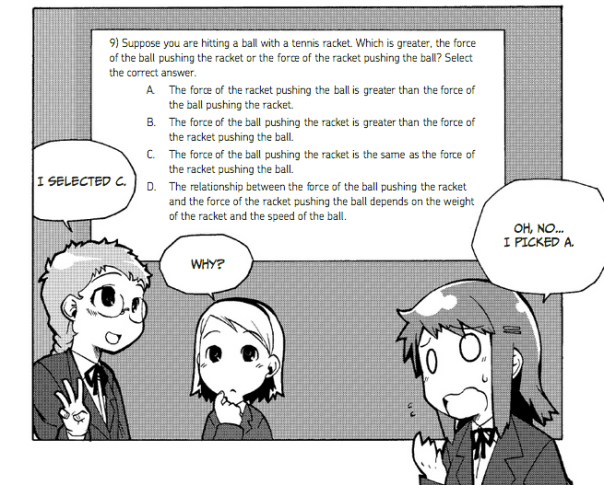
SampleQ from Manga Guide to Physics – similar to Concept Cartoons.
……….o0O0o……….
* Mother Jones article: the problem with men explaining things
GoogleTrends: Exploring Patterns in Search Data [DBQs & Inquiry]
GoogleTrends allows you to plot the popularity of search terms (since 2004), by geographical region or worldwide. This could be a great way to launch inquiry on a topic in science that has seasonal trends or patterns, and could be used to set up simple DBQ practice. It is limited in the linear presentation of data, and the data are search frequencies rather than scientific data, but as the patterns raise questions, they could be followed-up with searches for more valid sources and explanations.
In the example below, Frank Swain (@SciencePunk) had put in the search term “morning after pill” for the UK and found a peak every Sunday. An interesting pattern that could set up some discussion in class based on reproduction, behaviour, risk management, ethics, hormonal control or more.
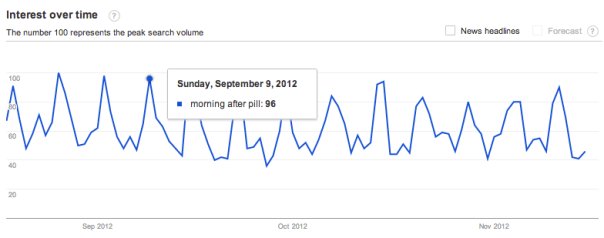
“Morning After Pill” search term on GoogleTrends http://www.google.com/trends/
This could lead to a quick (though basic) way to set up some simple data-based questions or stimulus for exploration. Here is a plot for the search term “vaccine”. Think of the questions it might raise in discussion.
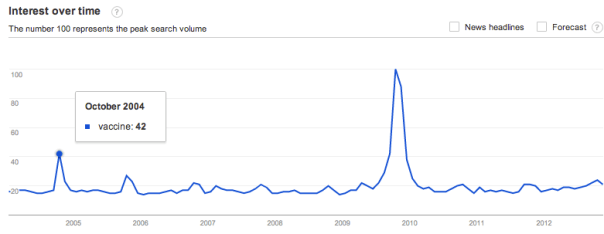
GoogleTrend Worldwide since 2004: “Vaccine” What DBQ’s could you ask?
What questions does it raise and how would it lead to further exploration? Here are some examples:
- Why does it peak each October?
- Why was traffic so high in 2009-10?
- What do you predict for the coming year?
This leads into discussion of sources of information, accessing databases and the reasons for vaccines.
One neat feature is that you can add other search terms to the graph in the same time period, though it will normalise the data. Another is the ‘headlines’ feature that shows some popular news headlines near peaks. Yet another is the ‘predict’ feature that will model the coming year based on trends and patterns. “Predict” is often asked in DBQ’s, so this might make for some good questions. Here’s what happens when we add “flu vaccine”, headlines and the forecast:
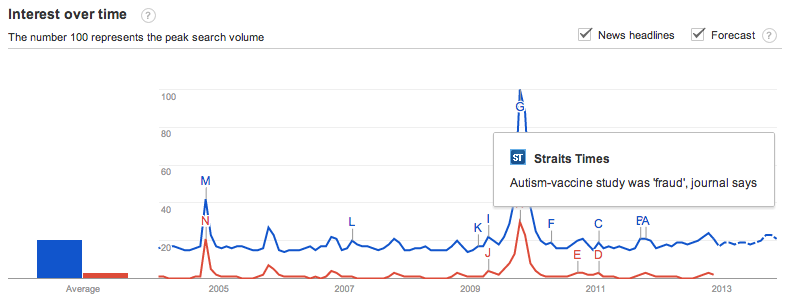
GoogleTrends: “Vaccine” and “Flu vaccine”, worldwide, 2004-present.
From this exploration, you could move onto looking at flu trends, and GoogleTrends has special sections for tracking flu and dengue fever:
……….o0O0o……….
This next one is a neat demonstration of what happens when you change the scale of the y-axis. In this case, the second dataset is added, compared to the original and the original becomes much less noticeable as a result. How many times do we tell our students to set appropriate scales on the axes and make use of the space to be able to see trends and patterns?
For another bit of fun, here’s one on “Genome”:
……….o0O0o………..
Summary:
- A quick, easy launching pad for inquiry
- Develop simple DBQs easily
- Does need to be supported by inquiry into more valid sources for the topic
- Each graph is ‘normalised’ which could lead into useful discussion of the effect of scales on data presentation
Quick Tips for Socrative Space Race

Try out Socrative!
Update Feb 2014: Added cards for beta.socrative.com space races.
I really like the Socrative Space Races and quizzes as a formative or pre-assessment tool. When set up and managed well, they lead to competition with a spirit of collaboration. It is the most user-friendly free clicker-type system I have tried so far.
These labels might help organise the races in your class and to avoid issues with confusion over who is controlling the rocket (sometimes there are clashes). You could hand out the cards to groups of students, make stands for tables with the rockets on, use them as stickers for a shared iPad or have multiple sets printed and laminated to be handed out as a ‘flexible grouping‘ tool.
If you can’t access the GoogleSlides presentation above, here are the cards as images:


……….o0O0o……….
Update Feb 2014: Added cards for beta.socrative.com space races.

Forces & Motion
As our G10 class get working on the Forces and Change in Motion unit, I thought it was time to update the resources to take advantage of the Stratos jump and try out GoogleDocs* and presentations embedded into WordPress.
This task was designed based on student feedback from the last unit test. Some students wanted more (!) test-like situations and practice with the criterion, so I put this together. Prior to this lesson we had some short discussion on prior knowledge on forces (based on sports day situations) and free body diagrams. The rest they were learning as they went along. It was more engaging than I expected – lots of reaching for whiteboards, cooperative arguments and research.
The presentation for the unit is first, with the stimulus video next and the task below.
Note: interestingly the GPresentation embedded fine, but the embedded GDoc lost its formatting.
Unit Planner Sample: The Nature of Biology
I’ve been trying to do a bit of Autumn cleaning on the site, as well as working on planners and curriculum jobs as MYPCo here at school. As a result, I’ve done a lot of reading of new IB documents (Concept-based learning, Approaches to Teaching and Learning etc) and review of older or more fundamental ones (Principles to Practice and so on).
Anyway, taking all this into consideration, I figured the unit planner was due an update and wanted to make one more useful for Biology. Here is an example:
For more (and a blank template), head over to the Unit Planning page. This is not an official IB product, so please treat it with due diligence.
One Direction Do Physics
A bit of fun for my Grade 10 group to work through as we’re on PD days…
There’s a Quia Quiz here, if you want to have a go too.